Current TV commissioned a video about my Truth @ 15 Frames Per Second series and I am happy to announce that it will premiere on Tuesday December 16, 2008 at 11pm on the Brand Spanking New Show (Edit: Turns out this was in the UK only). I know you’ve never heard of it. It’s a cable channel Al Gore co-founded in order to democratize television or something. I’ve watched it a bit, and they have some really great stuff. It’s like an all-year short documentary film festival. If you have cable or sattelite TV you probably get it. My new provider DirecTV has it on 366. Time Warner Cable is 103 in NYC and on various other channels in other cities. Dish is 196. Comcast is 107 in most cities. AT&T U-Verse is 189. Visit their website if you can’t find it on your local provider.
If you prefer to watch television on the Internet, you can watch the video here instead.
I’ve had an HDTV for almost two years now, and I’ve generally been content with the quality of HD television broadcasts and anamorphic DVDs. But when I saw I could get a Panasonic BMP-BD35 Blu-Ray player for only $250, I got myself an early Christmas present.
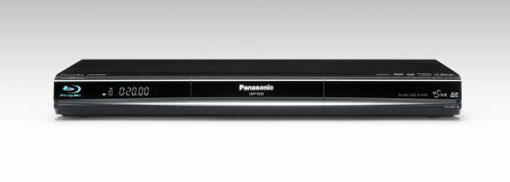
It arrived last night, and the first thing I tried was a blind A/B test of DVD playback. I hooked up the BD35 and my beloved Sony DVP-NS315 DVD player to the TV using component video cables. I saw almost no difference between them. The BD35 outputs 480p through component cables, and the 315 does 480i, but my Panasonic 9UK television does a great job removing 2:3 pulldown so the end result is basically the same.
It sounds like admitting I still watch VHS or something, but my TV is not even fully 720p. It’s 1024×720. I know, I know. It’s practically EDTV over here. It also doesn’t have an HDMI input, so I can’t test to see if the BD35′s upconverting is better than my television’s. I could get an HDMI input card, but on my Panasonic 9UK model plasma it can only do 1080i, not p, so I’m not that excited about spending over $100 to get something I can already do with component.
I don’t have any professionally produced Blu-Ray discs yet, so I tried burning my own. I don’t have a Blu-Ray burner or media, but I used Toast 9 to encode some of my own HD videos to AVCHD and burned it onto a DVD-R. It seems that most recently produced Blu-Ray players can read AVCHD encoded material from a DVD even though it’s not on a Blu-Ray disc. What I’ve seen so far is an increase in quality over SD DVD but I wouldn’t say it’s incredibly different. Of course there are a lot of variables in my experimentation so far. I don’t know anything about the relative quality of the Toast encoder. I do know it takes a long time to encode. It’s multi-threaded, so it’s pretty much maxing out all my cores, but it takes longer than almost any other kind of encoding I’ve done on this computer. My first tests were with DVCPRO HD 720p-originated footage, which at 960×720 is even lower resolution than my TV. Those didn’t show much difference from SD DVD at all. My 1920×1080 animated series (which originated as 12 megapixel stills) had a clearer increase in quality. The title graphics especially were much sharper. The US version I have will not play back video encoded at 1080p25, although I do get audio and a blank screen while it’s playing and a single tantalizing frame of video just as I hit stop.
Having a Blu-Ray player in my home got me excited about the possibility of producing Blu-Ray discs for films I work on. I looked into the manufacturing costs, and it wasn’t nearly as bad as I thought it would be. It’s about $4/disc to manufacture a short run of 1000. It’s not DVD-cheap, but it’s pretty good. However, the dirty little secret of Blu-Ray manufacturing is the dreaded AACS. DVDs had a quaint DRM system called CSS. It is still in use, but it was permanently broken nine years ago, and is absolutely no impedement for anyone who wants to make copies of DVDs. It costs money to add CSS to DVDs, and pretty much every large distributor still uses it. But the great thing about DVD is that CSS was optional. If I want to do a 1000-disc run of my short film, I only have to pay the manufacturer their fee, which has been subject to intense downward pressure over the years as competitors lowered their prices. Right now I could do it for about $1000.
AACS is mandatory for Blu-Ray. It is expensive. And it is not subject to price competition. If I want to make 1000 Blu Ray copies of my HD short film, I can pay someone like Pacific Disk a $500 setup fee plus $3850 for the manufacturing. That’s a perfectly reasonable price, and over the next year it’s pretty much guaranteed to go down. But before Pacific Disk can make any copies for me, I have to get a license from AACS. It costs $3000 just to get myself registered with them. Then I have to pay 4 cents per disc plus a $1000 order fulfillment fee, so $1040. There also seems to be a $1300 charge for a content certificate. In all it could cost more to get the AACS that I don’t even want than to actually manufacture the discs. That price could go down, or it could go up. AACS is the only game in town, so they can do whatever they want.
Basically in order to make Blu-Ray disc manufacturing economical you have to do huge runs. And that requires huge marketing budgets in order to get people to buy the huge number of discs filling up your warehouses. For now it looks like Blu-Ray will be dominated by the big studios who just happen to run AACS.

When I moved into my apartment 4 1/2 years ago, I had Time Warner Cable and their Roadrunner Internet. The Internet connection was extremely unreliable and after about 6 months we switched to Verizon DSL, which has been rock solid with the exception of a few days with a router failure down the street somewhere, or something like that. It was fixed fairly quickly. The Time Warner SD video signal was also slightly unreliable. I got some digital breakup every once in a while, and on demand type interactive things never worked.
Things got really bad when I got my HDTV almost two years ago. We didn’t have any HD broadcast channels for the first several weeks, and it turned out the wiring on the way into our house was done really badly. We eventually got TWC to send a really great contractor to run a new wire from the tap, which resides in the back yard of our neighbors two doors down.
Eventually though, it started to go bad again. We lost Fox and CW HD first, then NBC HD and ABC HD would go out intermittently. Good old CBS HD, the channel we only watch for 30 minutes a week, was always with us. A visit from a TWC tech confirmed that they would need access to the rat king in order to diagnose the problem. Unfortunately, nobody lives in that apartment anymore. It’s been gutted, and the construction workers are MIA. So it’s impossible to get back there without climbing over some fences and trespassing, which is something TWC is unwilling to force their employees to do. And even if they got in there, there’s no guarantee we wouldn’t have the problem again.
The only option we had left was satellite. Since we already have phone and DSL from Verizon, their package deal with DirecTV was very attractive. I’ve been afraid of satellite because in my experience, wires generally work better than no wires. But so far I’ve been proven wrong. Earlier this week we had a DirecTV satellite installed on our roof with a short wire going directly to our new DVR. If anything goes wrong we have easy access to the whole system (except for the parts in outer space). And while it’s subtle, I do think that the picture quality in general is improved. One thing I’ve seen for sure is the quality of Palladia (formerly MHD) which shows difficult-to-encode rock concerts. In the past month on TWC I’d been seeing a lot of macro blocks on cuts and flashes of light, the kind of thing you’d expect to see when there just aren’t enough bits to go around. I don’t see that at all on DirecTV.
The really great thing about DirecTV is the software. The interface is significantly less responsive than the TWC system, but I’m willing to give that up for the many customization options we’re give. The ability to remove channels from the guide is so great it overwhelms everything else, but I also appreciate the multiple ways I can search for programming, and the organization of multiple recorded episodes of the same series into folders.
A few extra HD channels are always nice too. The addition of Bravo HD, Sci Fi HD, and MGM HD are all exciting, especially once Battlestar Galactica comes back.
There’s a very early beta of networked media sharing which allows me to stream MPEG-2 videos from my computer to the DVR, but so far it’s a lot more work than just putting in a DVD or connecting my laptop to the TV. If it was able to play high-bitrate HD material it would be a great way to test out HD video I’m working with, but I’ve been unable to get anything over around 10 mbps to play reliably, and I can’t encode HD with Compressor at anything lower. I managed to get about 1 minute of my Time Travellin’ video to stream at 720p, which was impressive as a demo, but not particularly useful.
Another cool trick is the DirecTV website, which allows me to program my DVR remotely, and order up on-demand videos to download to the DVR. The downloading process is very slow, especially for HD video.
My main complaint so far is the lack of a clock on the front of the DVR box. I looked at the clock on my Scientific Atlanta 8300HD all the time and we don’t have any other devices in the entertainment unit with clocks on the front. I might have to take my binary clock out of storage.
The other problem was something I was able to solve, but I fear not many people would. When the installers set up my box, they told me I had to pick a resolution and stay with it. I could have everything scaled to either 1080i or 720p, regardless of how it was broadcast. I was disappointed at first, but after some digging around I found an “auto” resolution mode, which automatically switches the box to the resolution of the broadcast. My TV has a very good scaler, and I’d prefer that it do the work rather than the DVR, especially for film sources where it has very good 2:3 pulldown removal.